Site Effectiveness Tips
Make it Easy for Users to Do What You Want Them to Do

...and make it clear! Many sites clutter their pages with so many ads and options that the user misses the page's main objective.

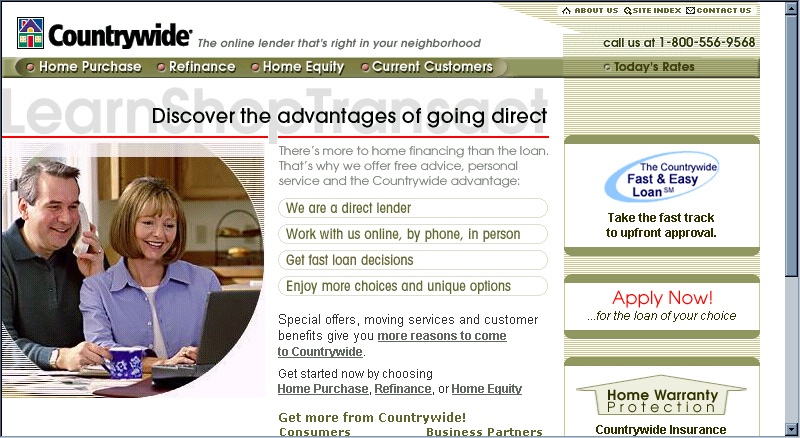
For example, the countrywide.com site, shown below. The site has so many options, that users may be distracted from noticing the most important one - "Apply Now! ...for the loan of your choice" - on the right-hand side of the screen.

This link should replace the photograph on the left and be the same size as the photograph, indicating its priority over everything else on the page. The photograph could be moved to the right (and see the next tip for more about location on the screen).

countrywide.jpg (180475 bytes)

Additional tips:
  • Make sure most users can see the most important elements on the page without scrolling
    The most important elements should be located in the upper left-hand corner of the page, since that is the area that can even be seen by users with small monitors. Note that a very large number of users view the World Wide Web using America Online's browser, which appears on users' screens as a window within a window; users therefore view a smaller area than with a regular browser.  (Click here for an example.)
  • Use easy-to-understand, unequivocal language; avoid "technospeak"
    Web designers tend to use technical terms; make sure your Web site uses language that its users will understand. And make sure users can anticipate the result of clicking on a link.  (Click here for an example.)
 
 Bureau West Research Group

Home

Research Tidbits

Tel: 1-818-752-7210

Email: info@bureauwest.com